(Movinkpad pro 14+Instant Pen Display Review) I do not recommend buying if you plan to use it as a cintiq

I really like the product as a portable device, I bought it because it was announced as being able to be used as a cintiq as well and I'll be moving out a lot these years, I do however need my pc, I do animation and the files I use are a bit much for portable devices.
While the product does have it's problems properly displaying the pc screen I can look past all that since I understand it's being used as a cintiq with just a USB C cable and sometimes it struggles to keep up and it's not that bad honestly. (But to be fair I'm now using the HUION Kamvas 24 4K with the same USB-C thunderbolt 4 cable and it displays it perfectly. It's a bother to have to move around with a 24'' heavy display but honestly I don't plan on going back).
But there's a few things I can't look past and I'll probably be returning my product soon if they are not fixed
-The main one is that while using the pro pen 3 you lose the right click on your pen, ALL the digital art softwares use the right click, specially to open menus, and having no alternative to it makes working on animation extremely annoying, it constantly breaks the workflow
-That said NONE of the 3 buttons on the pen can be used for anything, they pop up a menu with Alt Ctrl Shift shortcuts on screen which have no use since you are on your pc and already have your keyboard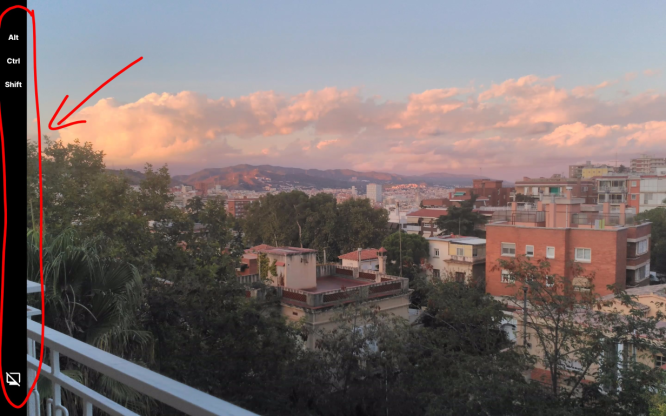
-The pen tip circle preview seen when the pen is close to the screen does not follow the pen when using the instant display making it feel a lot more laggy than it is
-Not being able to fully turn off the touchscreen makes working difficult since the touchscreen works far worse than the one from the ipad pro, I constantly try to use the gesture functions for them to not work because the pen is too close but at the same time I constantly press stuff on the screen with the back of my hand without realizing
-Wacom doesn't plan on making a proper tablet casing, the device is made with plastic and it's around 5mm thick it REALLY needs a case, and there doesn't seem to be any alternatives for a universal 14'' casing in any place that I could find, wacom only plans on making one that covers the screen but doesn't protect the sides
-The wacom stand is too expensive, If even against everything I said you still plan on buying the product I recommed buying any other stand from amazon, they are far cheaper and better.
-No pen holder magnetic or otherwise. This one is mostly a nitpick if you plan to use it as a portable device.
Honestly, if they only fixed the right click it would be enough for me to recommend the product, I can find solutions, workarounds or just learn to live with any of the other problems but that one is far too much, every single software uses it.
Please feel free to correct me if there's already solutions to any of these problems, I really hope someone knows how to fix any of these
English is not my first language, apologies for any typos.
-

You are right about every word you said. I bought the device and I am actually experiencing all of these issues.
1 -
It really is a bummer, it would be a good cintiq substitute otherwise :(
0 -

Hello,
Thanks a lot for the feedback. Please bear in mind that the Instant Pen Display feature is still in Beta. It is still being developed and being able to use the pen buttons to right click and other functions is a big feature request.
All the other points mentioned will be forwarded to the team as feedback as well.
1 -
I would have appreciated it if wacom was more clear on the selling page of the movinkpad pro 14 about these issues, I would have choosen a different product instead.
Thank you for your time explaining it João, I'm glad to hear wacom has people working on improving it and thank you for sending the rest of the feedback too.0 -
Hi RONNY BRAVO,
Duly noted. I'll let the team know and see how we can make this more visible.
Cheers
0 -

without better middle and right click options, it really needs fixing. Trying to use blender makes it awkward as hell. It also Took forever to get it registered so I could download the software.. the getting started pages are very unclear for the movink pro..
0 -
Hi Andy C,
Thanks for the feedback. We are aware of the challenges and working on it.
We are working directly with Blender to enhance the overall experience across platforms:
https://community.wacom.com/en-de/wacom-and-blender-strategic-partnership/0 -
FYI, the latest update adds support for Mac OS 26 Tahoe
0 -

Thanks for the updates joao. For those who want to try other solutios you can try superdisplay, it supports right click, touch gestures, 120hz, usb / wifi connection... Hope wacom can make something superior to this app but for now its fine for me.
0
Please sign in to leave a comment.
Kommentare
9 Kommentare