MacOS Tahoe: Jittering issue

Hello,
after upgrading to MacOS Tahoe, I have been experiencing issues with pen control. On slower strokes, the cursor visibly bounces around and I end up with a jittery line.
In this image, the first stroke was drawn as slowly as possible, the second one was at a speed that one would typically use for precise lines, and the third one was drawn as fast as possible. Before the MacOS update, all kinds of strokes were smooth.
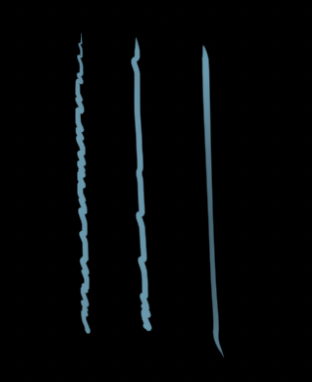
The issue can be somewhat mitigated by massively increasing the stabilization setting on each tool, but it still doesn't let me draw as precisely as before the update, and this introduces lag on bigger brushes.
I have uninstalled and reinstalled the current Wacom driver 6.4.11-2 multiple times to make sure it is properly installed, and I have also tried all kinds of pressure sensitivity settings, which all don't make a difference.
I have searched the forums for similar issues, and this information sounds like it could be related. Are there any news on that? Thank you.
System: 2019 MacBook Pro
OS: MacOS Tahoe 26.1
Wacom Driver: 6.4.11-2
Tablet: Intuos BT S CTL-4100WL
Software: Clip Studio Paint 3.0.4
-

Hi K A,
I don't think those issues are related as that user was reporting issues only at the beginning of the stroke and no shaky lines.
Have you tried the Adjust by Speed feature?
https://help.clip-studio.com/en-us/manual_en/810_subtools/C.htm#1405297
Also, seems that you are running an older version of CSP so you might consider updating this as well.
0 -
That setting has always been on, and changing it does not fix the issue.
As for the version, CSP has a weird license model. If you buy a perpetual license, like I did for version 3, you need to pay again to get feature updates, but bugfix updates are included in the perpetual license. So 3.0.4 is the latest version for my license. They even claim that it is compatible with MacOS Tahoe.
I just installed the free trial of CSP 4, and the issue does not seem to appear there. Guess I'll have no choice but to buy the upgrade.
Thank you for the response! It would have taken me longer to think of trying version 4 without that nudge.
EDIT: This comment hasn't been approved yet after almost two weeks (I hope the one person who manages these forums is okay), so I'll just put my additions here before I can forget.
The next day after upgrading CSP, the issue showed up again. It's been happening inconsistently since then.
I am now pretty sure that it's a hardware issue. The jittering only appears in the middle of the tablet where the surface shows wear and tear. Drawing in the upper left corner works perfectly fine.
So either it's a freak coincidence that this started the same day as the MacOS update, or something in that OS amplifies the issue that wasn't bad enough to be noticeable before.
The tablet is only 3 years old, pretty disappointing. The two tablets I had before lasted 5 years each.
0
Please sign in to leave a comment.
Kommentare
2 Kommentare