WinTab vs Windows Ink - Photoshop - Years of Dealbreaking Issues

I'm using the latest Windows and latest Wacom drivers + firmware, Geforce 5070 and 64gb RAM.
I've used a Cintiq 21UX, Cintiq 24HD and now currently my Cintiq Pro 27.
But all that doesn't matter since I've had the same issue over two separate PCs, Win10 and Win11.
It began when Adobe implemented the Native Canvas tech into Photoshop some 5-ish years ago It's been such a pain trying to draw and make it feel as it should. Brush strokes would lag in varying quality between each stroke. Very subtle at times, but enough to cause severely irritating cognitive dissonance. To the point of me becoming desperate in search of other drawing apps, but too many decades of muscle memory has me trapped. All this time, I've been blaming Adobe for the Native Canvas thing. (still do, TBF)
But after giving up my search for other options, I decided to reinstall a fresh version of the newest Photoshop. And things were soooo smooooth. I was so happy. Until I noticed I couldn't use my stylus to right click anything in the Layer panel. And I noticed anytime I had made a lasso selection of anything and tried to move it, it would snap back in place unless I dragged it far enough. Making tiny adjustments impossible. And noticing weird initial lag when dragging any sliders (Opacity, Fill, etc.)
And that's when it struck me. WinTab! Right! I've only had to bother with it twice since moving to PC from Mac. So I did the PSUserConfig thing and launched PS. Bliss. Right-clicking layers, selection moving and sliders working perfectly. But... Lines were back to feeling gross. WinTab and Native Canvas hate each other.
TL;DR
Native Canvas ruined everything. 5 years, no change. ("am I the only crazy person noticing" doubts.)
Using Windows Ink:
Responsive brush lines, feels amazing, no lagging even with brush-smoothing turned on. (Image: Custom 4px brush, 0% smoothing. 5% is my standard but looks the same.)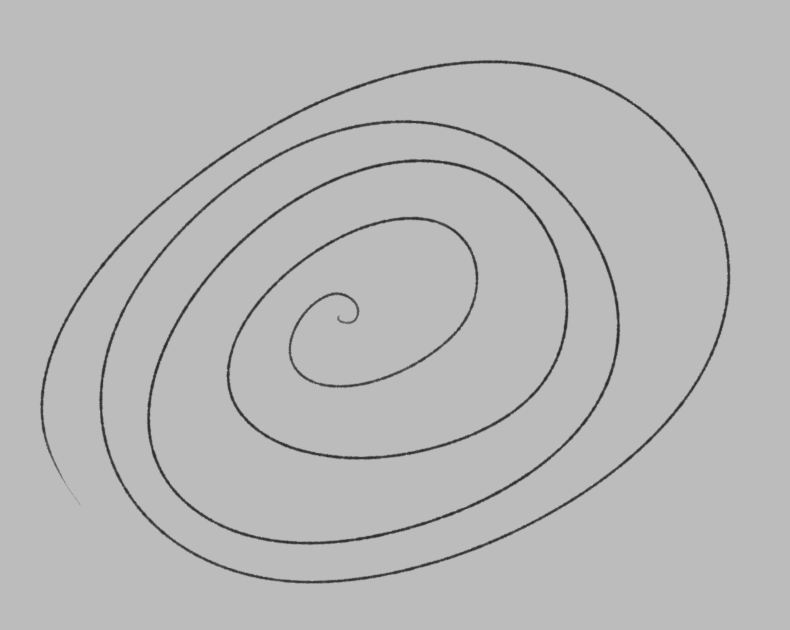
Had to turn on "Use Pen Button as Right-Click when applicable" in Pen & Windows Ink Settings to be able to Right-Click Layer panel.
Lasso Selections snapping back if not moved far enough; preventing small adjustments. Only happens on selections; not if moving a whole layer. Only happens with Stylus Pen.
Interacting with a slider (Opacity, Fill, etc) requires sliding it a fair bit before responding; preventing small adjustments. Only happens with Stylus Pen.
Suspecting the selection move and slider drag issues are connected under the hood, but I'm no coder.
Using WinTab:
Gross-feeling brush strokes. Subtle, intermittently poor stroke follow-through in 8/10 strokes. Polygonal curves and irregular sketch-line behavior. Regardless of smoothing% or brush size or brush spacing settings. (images: Custom Brush 4px at 0% smoothing and 5% smoothing)
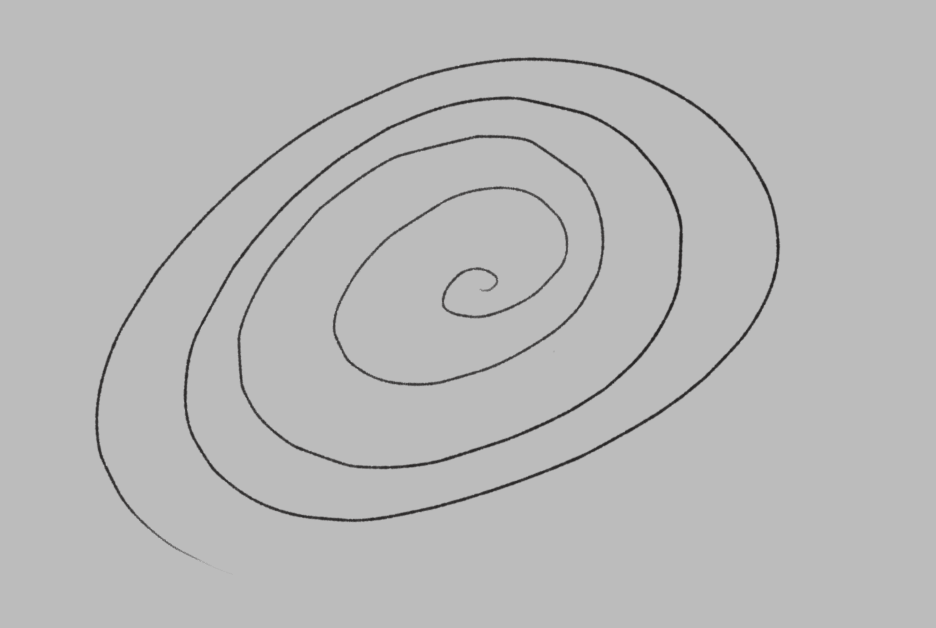

Everything else is smooth, nice and works as intended.
Having to pick one, I choose Windows Ink. The small issues I mentioned with it are driving me up the wall as I use the "features" very often. But the actual drawing experience is so so important, making WinTab a total no-go. If WinTab can get fixed and optimized... I can only dream.
I have to draw to make my living. There are no digital art options left in the world which doesn't make me feel like I'm going crazy. I don't mean to trauma dump, but I just want this sorted so I can go back into my art cave and freeze time. It's been years without peace. And it's so hard to know who to ask to get things fixed. Is it Adobe. Is it Wacom. Is it Windows. Probably all of them.
I figured this is a Driver thing. A request for anything.
Sorry for the big post and thank you for looking into things/responding with any insights,
Emi
-

Hey Emi.
You're absolutely right. It's truly awful at times.
My story is similar. I've been working with Wacom tablets for decades.
I also switched from Mac to PC at some point. Back then, I still had my very old Intuos 4 XL Ptk 1240 – it was great because I could use it with two monitors, and the resolution was acceptable. Unfortunately, Wacom never delivered on their promise of a newer model in that size. I waited for years.
Then I saw a suggestion here in the forum that I could also use two tablets simultaneously. One for my drawing monitor, one for my tool palettes. The idea was fantastic – but getting everything working was a real ordeal – in the end, it only worked with WinTab, since Photoshop didn't provide pressure sensitivity with Windows Ink for me – and the sliders didn't work at all.
Then came the update from Photoshop 27.3.1 (where everything worked perfectly) to 27.4 – and everything froze when using the tablet, so I had to stick with 27.3.1. Now came 27.5 – and initially, great joy – WinTab no longer worked – but at least everything worked with Windows Ink!
But now the frustration starts again. Drawing itself is better than with WinTab, you're absolutely right – but the sliders (only move in jumps, constantly freeze), entering numerical values (you can only select characters correctly by sheer luck), using the lasso, moving objects – everything is glitchy, sometimes more, sometimes less – it's all incredibly frustrating.
And just now, another bug appeared: if the lower Wacom pen button is defined for right-clicking, it triggers an incorrect RAM error when using the Delete tool. You have to deactivate the lower pen button and assign the right-click to the upper side button to access the context menus (finger contortions included).
I'm having similar thoughts to yours. Is it the driver, or is it Photoshop? Couldn't they implement ONE standard (e.g., Windows Ink, if the interface is more modern) – AND thoroughly test EVERYTHING in Photoshop, optimizing here and there as needed, so that everything runs smoothly: the drawing (which is what Wacom pens are designed for) – AND the operation in Photoshop (which is, after all, the main program they're used with)?
Hubertus
Setting:
-
Photoshop 27.5.0 (Photoshop 2026)
-
Windows 11 25H2
-
NVIDIA RTX 4090 (latest Studio Driver)
-
Wacom Intuos Pro (PTH-860 / PTH-660) with Pro Pen 2
-
Wacom driver 6.4.12-3
-
Windows Ink enabled
0 -
Please sign in to leave a comment.
Kommentare
1 Kommentar