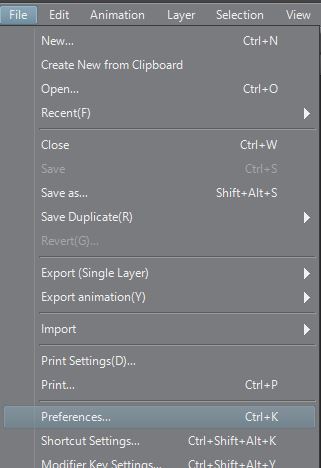
When opening Clip Studio Paint Pro for the first time the a Wacom Tablet, you may see an offset with the pen and cursor on the drawing canvas. To resolve this issue, please follow the steps below. If the issue continues after making these changes, or if you have any questions, please use the “contact us” button below to reach our support team.
- Go to File and select Preferences.
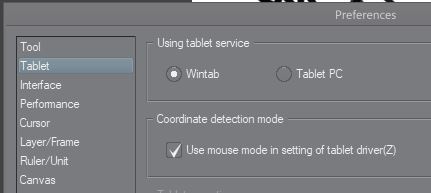
- Click on the Tablet section of the preferences.
- Make sure “Wintab” is selected under “Using tablet service”
- Under “Coordinate detection mode” turn on “Use mouse mode in setting of tablet driver”
- Click “OK” and then close and Reopen Clip Studio