The touchpad is acting strange

I bought a Wacom Intuos Pro s (2019) for its interesting touchpad option combined with a pen, but I've noticed that:
1. Sometimes tapping with one finger doesn't respond as it should.
2. Vertical or horizontal scrolling (the latter is sometimes very sensitive) gets "mixed," causing complications in apps like Excel or Excalibur (in Obsidian) (in this one, horizontal scrolling is very sensitive).
and generally deteriorating the user experience.
I wanted to know if this could be caused by the Windows settings or if I'm not understanding something?
In any case, the reason for this question is to know if anything can be done to improve the functionality of points 1 and 2.
And completely off topic... Is there a video or guide that better explains the "Basic/Advanced Movements" features? The descriptions of Wacom Center have not helped me to fully understand all the functionalities.
-

Hi Juan Renzi,
The touch input uses the standard Windows input.
For 1, could it be that the pen is still in proximity thus activating palm rejection?
For 2, not familiar with Excalibur, but on Excel this is similar to the experience I have had so far. It is quite sensitive. Unfortunately, there is no way to reduce this sensitivity in the Wacom driver settings.
For a better overview of what you can and cannot do, you can check this video. https://www.youtube.com/watch?v=-mQn5nz-o0k
0 -
1. It's not because of the pencil, since it was far away.
2. I read somewhere that Windows mouse settings might have something to do with it?0 -
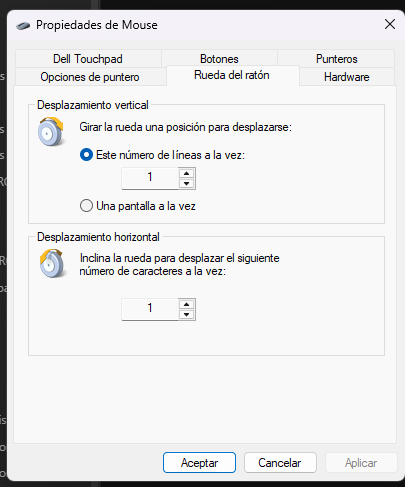
Okay, I think changing the "line breaks" can reduce the sensitivity a bit.
0
Please sign in to leave a comment.
Commentaires
3 commentaires