Strange warping when drawing lines on certain parts of cintiq 16 screen

For a few weeks now I've noticed that when I draw on certain parts of the screen my cursor will veer off course. I'm using mostly clip studio paint on a computer running windows 11. I've tried calibrating the pen in tablet properties, updating to the latest drivers, restoring default settings through the Wacom Center, and replacing my old cables. I took this screenshot to show the warping. It's always in those specific areas of the screen in this specific pattern. I drew those lines with a physical straight edge so I know the lines are wobbling because of how the display is reading the pen's input and not how the pen is actually moving. I also tried drawing in mspaint to make sure it wasn't just clip studio acting up, and I saw the same pattern of line wobbles there.
-

Hi Caden Roylance,
Unfortunately, this means that the sensor on your tablet is defective on those 2 sections:
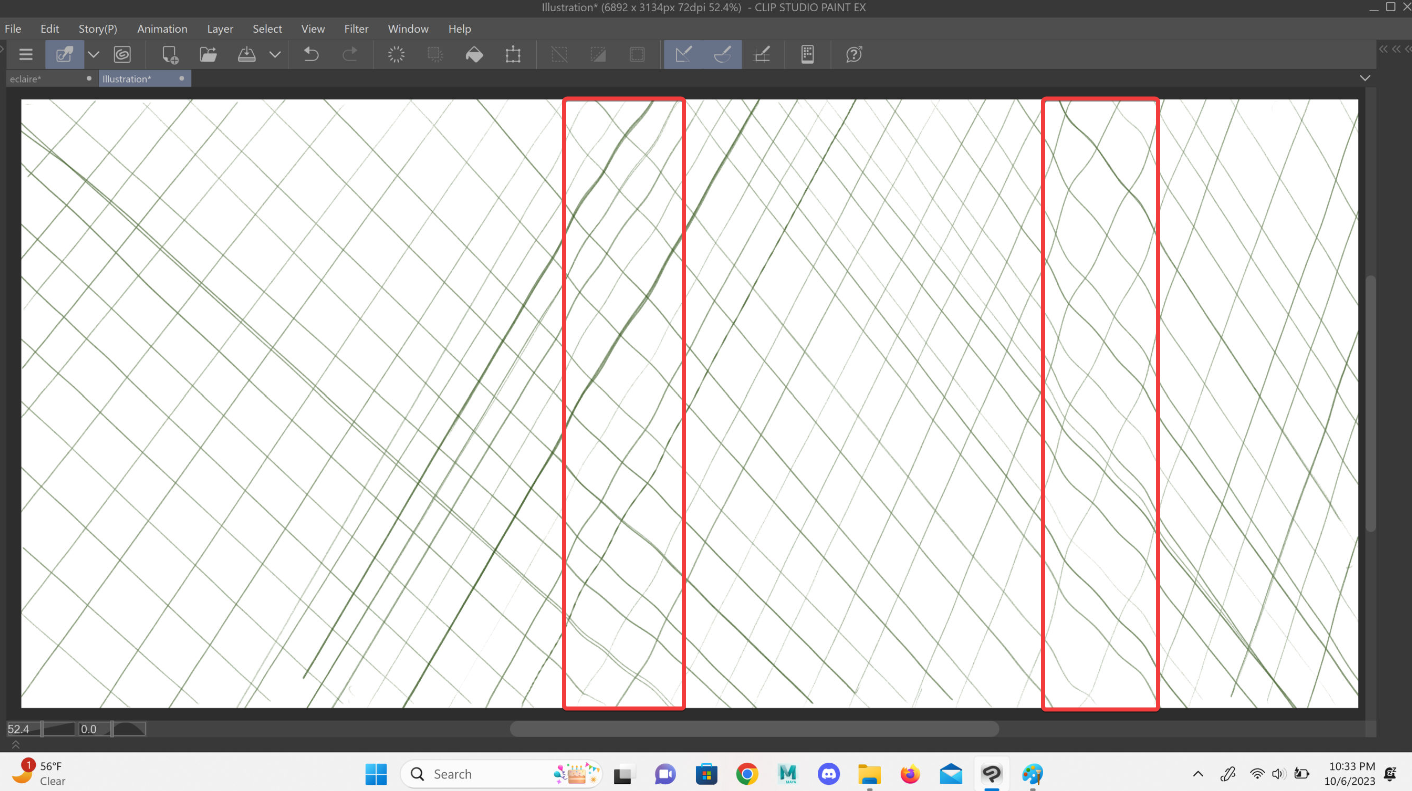
The sensor will need to be repaired. I have created a support ticket for you. Someone will reach out as soon as possible.
0
Please sign in to leave a comment.
評論
1 條評論