how to disable screen-change indicator popup ?

hello,
since one of the recent updates, there is now an icon popping up in the middle of the screen,
whenever i switch from one display to the other. this icon appears in the middle of the active screen.

please, can i turn it off ????
its buggy. it pops up almost with every movement of the pen i make.
yes, restarting the driver fixes it, but only until i switch apps.
please, let me turn this off.. i need to get some work done here
is it possible ????
-

Hi malte maas
That icon appears when you use the Display Toggle function.
If your device has expresskeys, you can disable this by disabling the Express View checkbox in the ExpressKeys settings.
If you don't have this option, then there is currently no way to turn this off but the team is looking at an alternative is a future driver release.
0 -
yes, it SHOULD appear when i use the display toggle,
but it also appears when i hover above different areas or windows within an app. (currently using blender and 3dcoat)
the icon pops up when i am klicking on the brush size, brush type, brush opacity, color, layer, etc.. every time i go to a different area of the app, the icon is flashing in my face.
its a tortue.. i restart the driver like 80 times during the day, since that helps a little on windows10
but at home, on windows11, even restarting the driver does not help at all.
at home, i just have to live with that.. its driving me nuts.
0 -
Hi malte maas,
That is really not normal.- Does the cursor actually change displays when the icon appears?
- Which device are you using?
- How do you have Display toggle setup? To an ExpressKey or some other method?
- Do you use the same device on both home and office or do you use different devices?
Just trying to understand a bit better what could trigger this unwanted reaction.
0 -
i made you a quick video showing my setup and how i switch monitors and how the problem looks to me
https://photos.app.goo.gl/MipJdQw4WNccg2P3A
0 -
Hi malte maas,
Thank you so much. That video really helps understand the problem.
I have sent you an email so we can troubleshoot this further.0 -

Same for me. Driving me crazy. There must be a way to turn it off! What am I missing?
0 -
Hi Daniel Olsén,
Yes, if you have the latest Wacom driver installed, you can disable it by turning Off the Express View feature:
 1
1 -

For the Cintiq the toggle to turn it off is here:
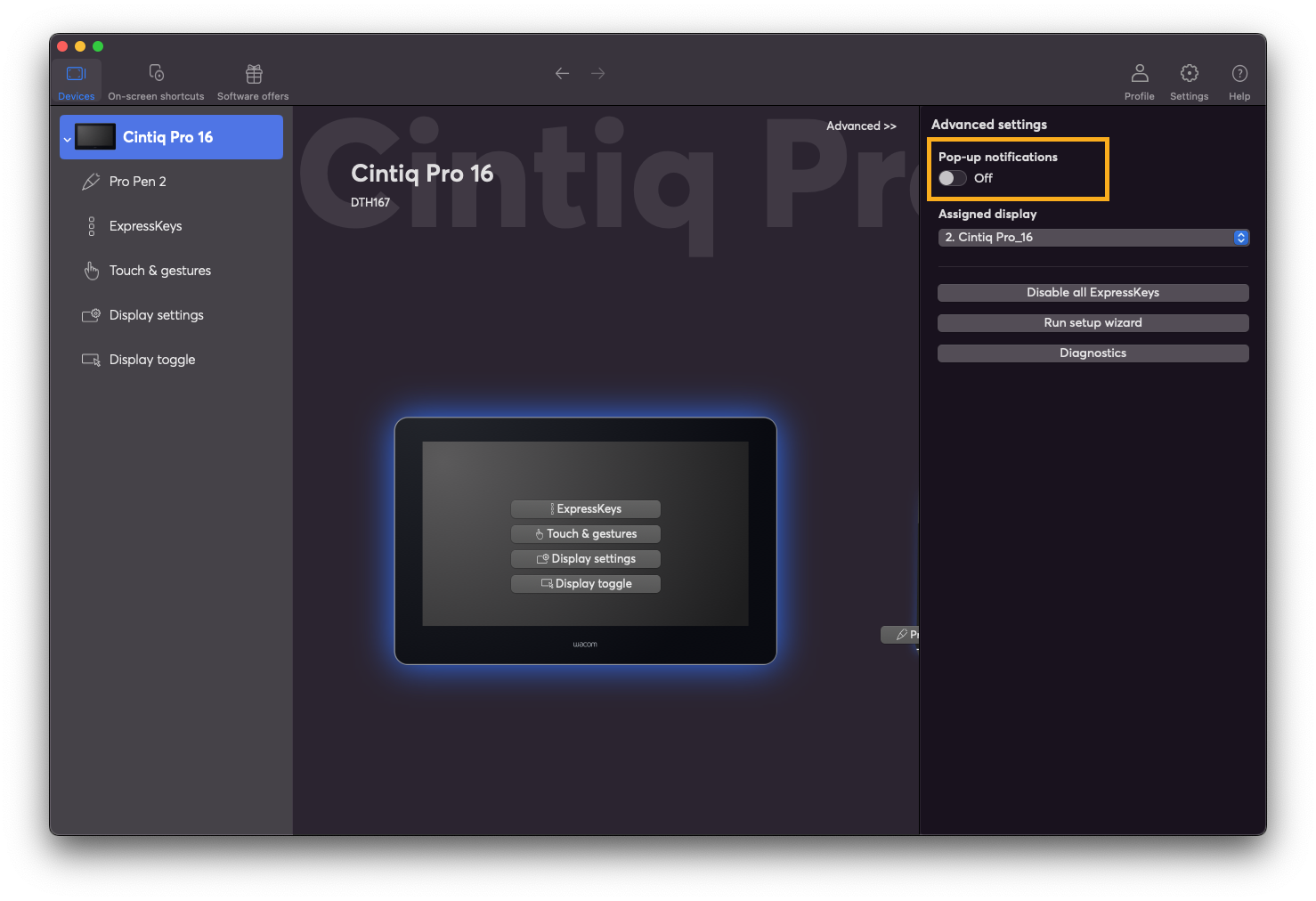 1
1
Please sign in to leave a comment.
評論
8 條評論