Wacom Tablet Properties - All settings reset to default after loging out

I'm currently having an issue where Wacom Tablet Properties resets all my settings to the default values after logging out. I have tried to use the Tablet Preference File Utility and Wacom Desktop Center programs to backup and restore my settings however both result in an error when attempting to load the backup file.
Its worth noting that I am using a workstation that is managed by the company I work for so it wouldn't surprise me if there is something funny going on with how that is all managed. But if anyone has any advice I'm all ears.
OS: Windows 10
Tablet: Intuos3
Driver Version: 6.3.15-3 (latest)
-

The settings are stored in C:\Users\[username]\AppData\Roaming\WTablet
If the account is setup to wipe the data here each session, then you will lose your settings. The other option would be that somehow the system doesn't recognise that this is the same device that was plugged in earlier and does not apply the settings correctly.
Since it seems you are working in an IT controlled environment, perhaps it would be better to use a more recent version of the driver that has additional features for such environments and a more modern device.
The Intuos 3 is over 20 years old so it won't be supported with the more recent drivers either.
If you would like some additional advice, please let us know.0 -
Hi João,
Thanks for the information that will be very useful in my trouble shooting.A follow up question. What file should the settings be saved within? Would it be a .wacomprefs file like that which is created when backing up? Within the WTablet folder I see two files, "WacomTouch.xml" and "WDCLogFile.txt" of which neither seem to be related to any settings.
I knew the Intuos 3 was an older device but I didnt realise it was over 20 years old at this point! I guess it shows these devices can last a long time even with very regular use.
0 -
Hi Alexander Dickson,
You should also have a Wacom_Tablet.bak and Wacom_Tablet.dat files.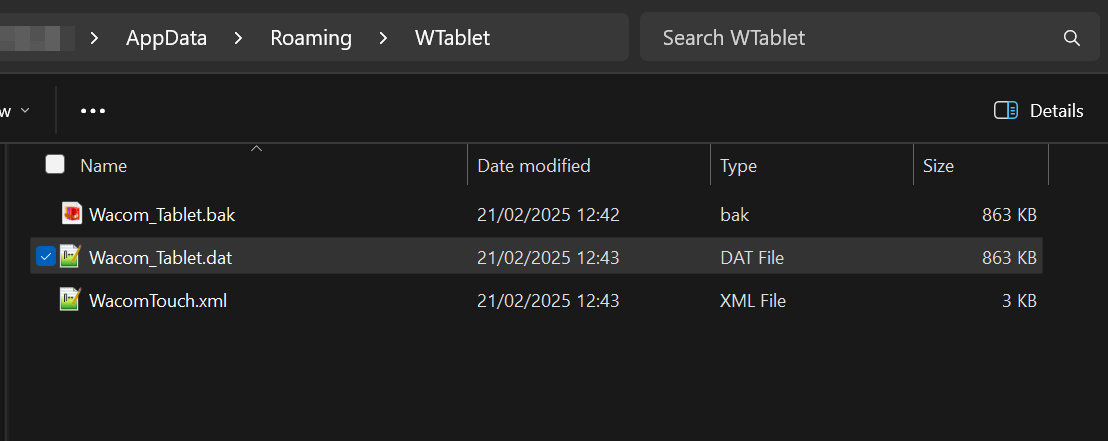
Perhaps with driver 6.3.15-3 it was stored else where... This is the file location in the most current version of the driver.PS: Yes, 20 years is a long time in "tech" years. Our devices are built like tanks since we want to make sure users get the most of their investment.
0
Please sign in to leave a comment.
評論
3 條評論