Problem connecting Wacom Cintiq 16 (2020) to Mac mini M4

Despite trying hard to rectify, I can't get my Wacom 16 Cintiq to connect with my 2025 Mac Mini M4.
We have had the Cintiq since new in 2020, and it worked fine with my previous PowerMac. It also works perfectly with our 2020 iMac (running Sequoia 15.6.1) and our brand new Mac Book Air.
When trying to link with the Mac mini the 'pen' does seem to connect, but the screen on the Wacom displays the message '! Information - No Signal - Go to power Saving mode'
I have tried plugging the USB lead into the Mac mini, with the HDMI lead plugged into the monitor, and also both cables directly into the USB C port on the Mac mini (using an adapter) but nothing seems to work.
We have googled various security and permission settings and tried these, but nothing seems to work!
Can anybody help? -thanks!
-

Hi Richard Crossley,
From your description the Cintiq and the 3-in-1 cable seem to be working as expected. I think the problem can only be the video adapter (HDMI to USB-C). I would recommend you to try to replace this for a good quality one.
0 -
Thank you for your suggestion Joao. I have tried a selection of HDMI cables and adapters and unfortunately the problem still persists. Hmmm ...
0 -
Update - I have fixed the problem. It turns out that the front left USB-C port on my Mac mini will not handle the input from either the HDMI directly from the Wacom, or the HDMI from the monitor (in both cases using an adapter to step down to USB-C). Switching to other ports solved the issue. I can only assume that the front left port socket is either faulty, or else it is only rated for simpler devices (A plug in mouse works in this port for instance). I wish the Mac mini had 2 HDMI ports!
0 -
Hi Richard Crossley,
That makes sense. According to Apple, the front ports are only USB-C (no video) and the back ports are actually Thunderbolt which can carry a video signal. Good to know :)
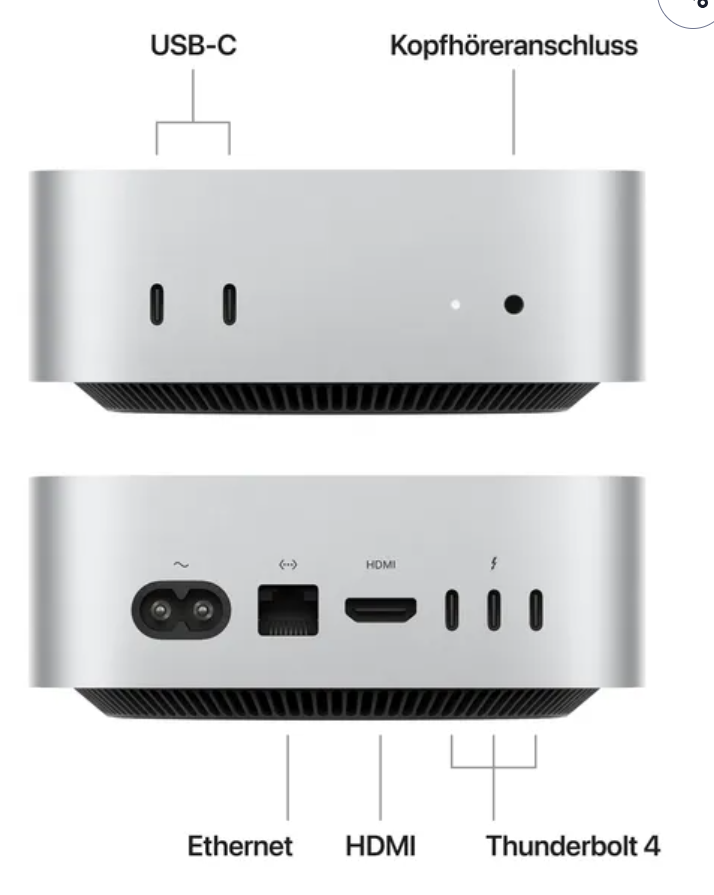 0
0 -

A little late on the reply, but I wonder if you had updated to Tahoe before experiencing the connection problems?
If you do a search, you will find lots of people reporting USB problems after updating to Tahoe, especially with USB C displays.
If the above is the case, even if all is fine now, if you have not already, boot your Mini in Safe Mode by holding down the shift-key. This will clear any cache and clean up the OS of any left over garbage.
My Mini M4 had zero issues until I updated it to Tahoe, and then my USB DAC became unreliable with the back ports, so I moved it to the front. Then after a second update for Tahoe, my front ports stopped working reliably... And then my Wacom Cintiq Pro 16 2021 model -- which was always plugged in via USB C to a 40Gb port on the back, died the next day. Coincidence? My thought is no.
Long story short, after updating to the most recent version of Tahoe and then booting the computer into Safe Mode, that fixed the ongoing problems I was having with all of the USB ports. My DAC works fine again and I'm sure my Cintiq would if it were still working.
0
Please sign in to leave a comment.
評論
5 條評論