Small spikes on straight lines Wacom Intos Pro M

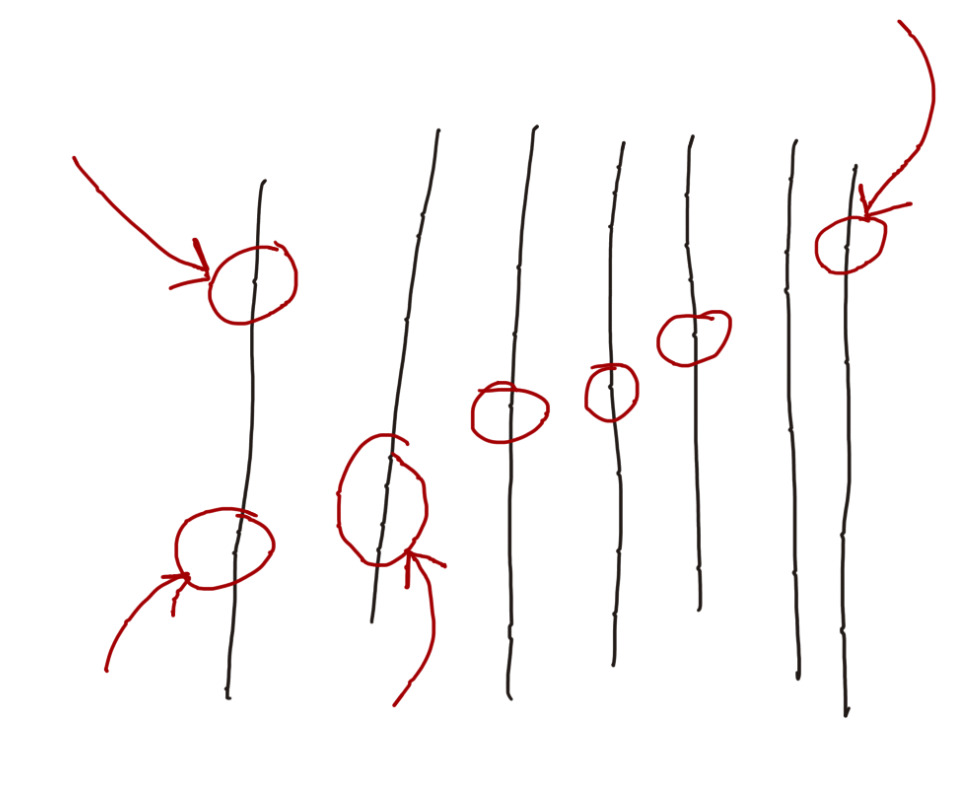
I tried uninstalling the driver and reinstalling them a few times and even tried using my friend's same exact tablet and I still see the problem.
I use the Macbook Pro M1 Pro 14" with a 32 inch benq monitor.
I was using an xp-pen deco before this and never had this problem. I made sure to uninstall all the xp pen drivers as well and restart my computer after uninstalling or installing anything.
The Tablet is also brand new.
I don't see the problem as when I use much thicker brushes but with small brushes its practically unusable.
Drivers are up to date.
-
I also tried using different Pens(wacom art pen) and Pen nibs, but facing the same issue
0 -
And I also tried using different software: Photoshop, Krita and sketchbook pro
0 -

Hi Maher Zi,
Is the tablet directly connected to your Mac computer? This looks like some interference being picked but by the EMR sensor of yours and your friends tablets.
This is a list of some devices that could cause interference:
Potential sources of RFI and EMI include:
- various types of transmitters
- doorbell transformers
- toaster ovens
- electric blankets
- ultrasonic pest control devices
- electric bug zappers
- heating pads
- touch controlled lamps
- multiple CRT computer monitors or televisions sitting too close to one another
- wireless networking devices
- Bluetooth devices
- baby monitors and cordless telephones
- video senders
- microwave ovens
- electric motors
- transformers
- heaters
- lamps
- ballast
- power supplies
- metallic items in close proximity to the tablet (e.g. metal desk/frame, desk motors)
- walls of buildings may contain electrical components for utilities
- walls of building may contain metal, rebar or beams that could interfere
- electrical junction boxes near area of operation
0
Please sign in to leave a comment.
Comments
3 comments