my tablet's driver is broken. CINTIQ 16

my tablet's driver is broken.
He changed the resolution of my tablet and lowered it.
impossible to reassemble.
my stylus cursor is also out of order and impossible to calibrate.
I've reinstalled the drivers several times now and the problem persists.
Help!
Thank you
-

Hi Noa C,
The Wacom driver does not control display resolution. The display component of the Wacom Cintiq 16 would still work even if you didn't have the driver installed. From what you describe, there is a problem with the HDMI connection and your operating system is unable to read DTK-1660 monitor specifications.
Please check the connection and replace any adapters if you are not connecting the HDMI cable directly to the computer.
Also make sure you update your system fully including graphics card drivers and etc.
0 -

same problem with me and its very bad ,
max resolution is set to 1024*768
wacom driver dont open display options
and all hardware is ok because I checked is in the store I bought it from0 -

Hey so, I was just having the same for problem for like almost 5 months, i tried EVERYTHING, in one post of reddit I found it how to fix, while searching the solution I found this post and I don't know if you still has the problem, but if you do try this thing right here :
- Opening the NVIDIA Control Panel (or your graphics driver)
- In the task list on the left click on 'Change resolution' under the 'Display' category
- Click on the display associated with your Cintiq
- Click the 'Customize...' button underneath the list of resolutions
- Make sure 'Enable resolutions not exposed by the display' is checked
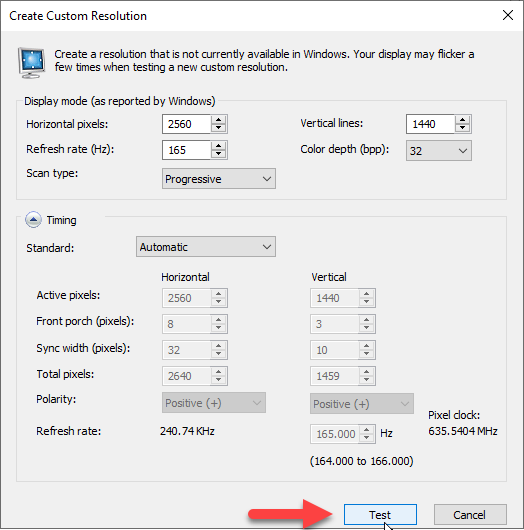
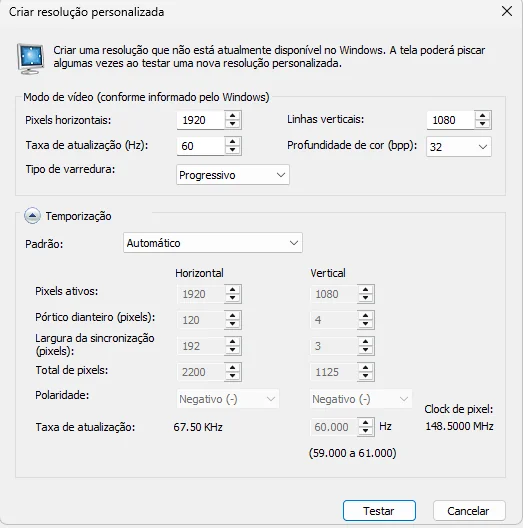
- Click 'Create Custom Resolution...'
- Put the numbers that shows in the image bellow (the righ config is the portuguese one, i just put the english one to show the translation, or if you want to UltraHD)
- Hit 'Test' and you should see it has the correct resolution and isn't blurry then hit 'Yes' in the popup and then 'Apply'.
This is what it work with me, I hope that helps somebody else!
 0
0
Please sign in to leave a comment.
Comments
3 comments