Wacom only on one screen

Hello,
I have a Wacom One 13 and it is displayed on my 2 screens (iiyama prolite XUB2792UHSU).
I would like to display only one but in the options indicated here:
https://101.wacom.com/UserHelp/en/DisplayToggle_Opaque.htm
I don't have the device menu, I just have application, what should I do please?
(Windows 11)
Thanks
-

Hi Bertrand Carme,
When you mean displayed, do you mean you have the same image on both your Wacom One 13 and your 2 other displays? Also, what do you mean by application and device menu?
I think the 1st thing you need to ensure, is that you setup your displays correctly and for this you need to use the Windows Display Settings - https://www.youtube.com/watch?v=AOKAwni0MOY&t=33s
Once this is done, make sure the Wacom driver is installed correctly and that you follow the steps here:
https://www.wacom.com/en-de/getting-started/wacom-one-pen-display0 -
I'm talking about the top menu on which I don't have "devices"
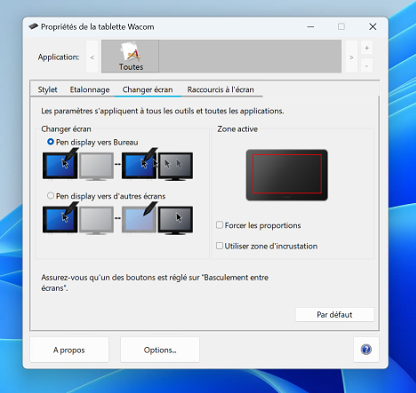 0
0 -
Hi Bertrand Carme,
The Wacom One has a more minimalistic interface and you don't have more than one Wacom device so the "Devices" panel won't appear.
Also the Display toggle function is simpler.
0
Please sign in to leave a comment.
Comments
3 comments