Wacom One Gen 1 stopped working. Again.

I've been using a Wacom One Graphics Tablet since 2020. It worked great for about 2 years until it suddenly stopped working. It was purchased at Best Buy and we were able to get a replacement for no cost. Which is great. The second one didn't last a year before it too stopped working. I don't travel with my tablet, it's kept at my desk. I'm careful and I make sure it's always plugged in and that my drivers are up to date.
So we had to replace it again. Mostly because it was cheaper than buying the X-type cable, which we suspected was the issue with the second one. I'm on my third, and it's not replaceable now that there's a 2023 Wacom One Graphics Tablet.
I realize this isn't an uncommon issue, but it's really frustrating. I can't afford to upgrade, and when I bought it, it was intended to be an investment.
When it is plugged into my computer, I get a no signal sign on the tablet itself. My computer screen behaves like it usually does when a secondary screen is added, and the Wacom logo does show up upon turning it on, but then nothing. It's been checked on more than one computer now, and it's the same result. The USB ports have been checked and cleaned. There are no obvious physical issues with the tablet or the cable. The drivers have been updated, rolled back and updated yet again.
This is ridiculous. With how much that cost new, and the fact that it's had to be replaced by the exact same model twice now, I'm not just frustrated, I'm livid.
-

Hello Morgan Campillo,
Thank you for reaching out. I am really sorry to read about your situation.
From your description, seems we could isolate the problem to the connection, since you do have power on the device (since you see the Wacom logo and the no input signal message).
Just to be sure, please make sure you have connected the X cable to the Wacom ONE correctly as described here: https://support.wacom.com/hc/en-us/articles/1500006333382-How-do-I-connect-the-Wacom-One-DTC133-to-a-computer
Please note that the direction in which you connect the cable matters. Sorry if this seems obvious, but it's more common than you would think.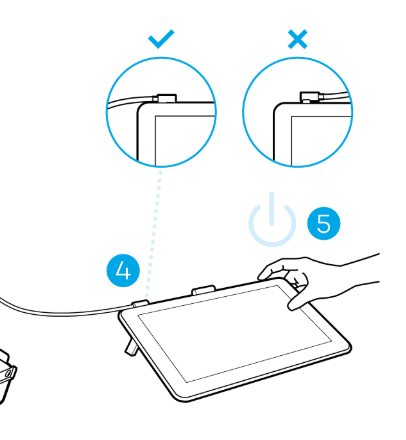
If the problem persists, then I am afraid that the cable might need to be replaced once again.
0
Please sign in to leave a comment.
Comments
1 comment