Line issues with Intuos Pro S 2025 (mac tahoe)

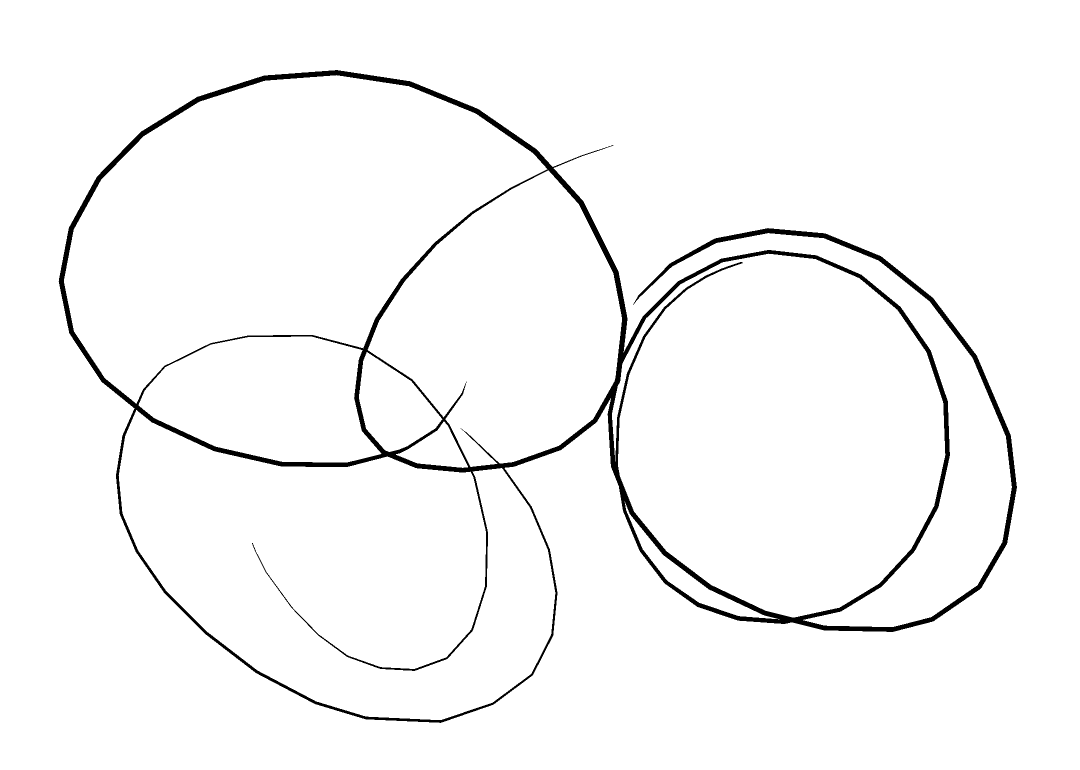
all my strokes come out looking like this. this isnt an issue ive faced on other wacom products before, that said this is the first time ive used a wacom product on mac. any help would be greatly appreciated. thought this was an issue with my drawing program but its not, its doing this in the pen tester too. does it with both my pro pen 2 and 3. restarted several times, tried different versions of the driver, this keeps happening. wasnt happening like this on mac seqoia. any help is greatly appreciated
-

Hi R.F. SLAM,
That is interesting. I have not seen this before.
Can you please confirm which driver version you have installed and if you have already performed a clean uninstall and reinstall?
0 -

there's nothing new to it, I have the same issue
m4, tahoe 26, pth6600 -
Hi Igor Kamennoy,
What do you mean by "there's nothing new to it"?
Did you have this issue in the past? have you tried what I recommended the first user to try already?
What connection type are you using with your Mac?
0
Please sign in to leave a comment.
评论
3 条评论