Intuos Pro M PTH-660 not working with Mac OS Ventura

Hi, maybe someone can help. I just switch to Mac mini M2 Pro, however my tablet is not working. I reinstalled all drivers and allowed app to be visible in System Settings. Also allowed Wacom to be checked in General/Login Items.
Still no results, and now I can't even open Wacom Center (due to "tablet driver is not responding" )
Is anyone who solve the problem ?
Thanks in advance!
-

Hi Tomasz,
After updating all the permissions as prompted, did you restart your Mac? This is usually needed for brand new machines.
Also, please see https://support.wacom.com/hc/en-us/articles/1500006339902-What-does-the-error-message-The-tablet-driver-is-not-responding-mean-and-how-do-I-fix-it-
0 -

Ola Joao.
I am having a similar problem. Just picked up a new Mac mini pro and followed the migration of my system from my older Mac (MacBook Pro).
As soon as I rebooted after all installations, etc... it came out with a screen message/prompt stating that a file was damaged and no matter what I did that message kept showing up.
Sorry, I did not get the file in question but I recall it was something *...manager
I tried uninstalling the driver and software through the uninstall option on Wacom software and that didn't work either. I had to manually deleted files from Applications and Libraries...
Tried a new install following the notes on your website and that didn't work either. Same message for that file that I assume it relates to the launch of Wacom software (login items) a this prompt will not stop appearing until I removed Wacom from the login items...
Need some help with this as I need the tablet to work and it is a bummer that I can't at the moment...
Thx/Obrigado
1 -
Hi Henrique,
We have seen in the past some issues with permissions when you migrate your account into a new machine.
Please try this:
- Unplug the tablet
- Remove all the permissions manually by highlighting the Wacom items and clicking the "-" button:
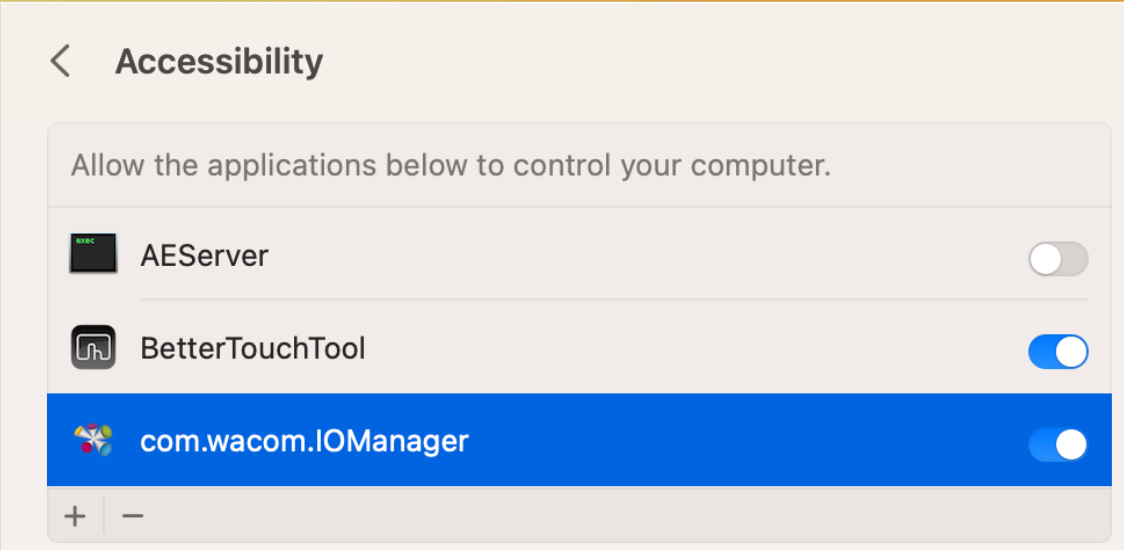
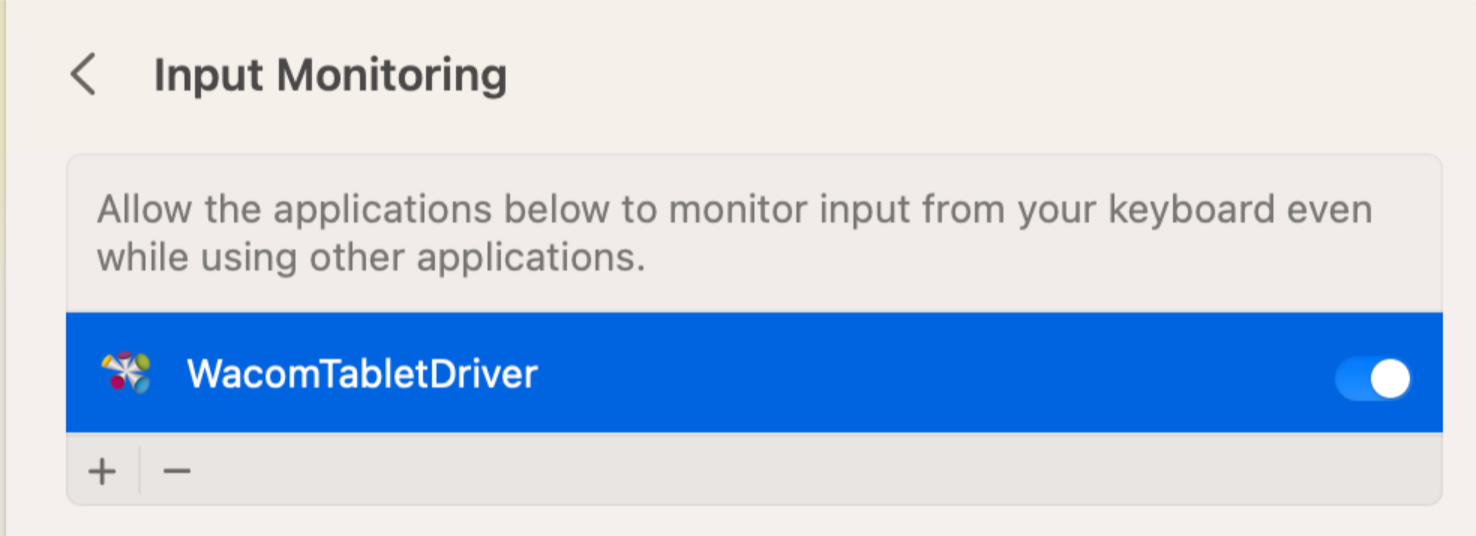
- Reboot
- Uninstall the Wacom Driver - https://support.wacom.com/hc/en-us/articles/1500006264541-How-do-I-uninstall-manually-and-re-install-the-Wacom-driver-on-macOS-for-a-Pen-Tablet-Pen-Display-or-Pen-Computer-
- Reboot
- Install the latest driver version if - https://www.wacom.com/en-de/support/product-support/drivers
- Re-add the permissions as mentioned here: https://support.wacom.com/hc/en-us/articles/9753655984663-Is-there-a-driver-for-macOS-13-Ventura-
0 -

Hi João
I already follow all of this steps, but it still failure. my computer and tablets version are this:
Processor 2.6 GHz 6-Core Intel Core i7
MacOS ventura 13.5.2
Driver Version 6.4.3-2 (macOS 10.15 - 13)

Could you please help? Thanks0 -

Hello - I am yet another person with this same issue. I have tried everything mentioned in this thread, removing, reinstalling the Wacom software, making sure my preferences are all in order, restarting the computer everytime changes aree made. Nothing seems to work to make this tablet work. Can someone from Wacom please clarify if this is a known issue with the current driver? I have wasted hours trying to resolve this.
I have the same exact specs as Katherine Wen above:
Processor 2.6 GHz 6-Core Intel Core i7
MacOS ventura 13.5.2
Driver Version 6.4.3-2 (macOS 10.15 - 13)
Any help at all would be much appreciated. Thank you!
0 -
Hi Kevin Sharp
I logged out my mac and create a new user then everything is normal in the other user page.
Because I discuss with many engineer friends they all thinking, this is a weird situation🤷🏼♀️
hope is a useful solution for you.0 -

I have tried everything here mentioned and have lost half a day on this...unbelievable. How can wacom make things so complicated and not be able to work on Ventura. Anyone else could help?
0 -
Hi Delano Jose,
Please try this if you haven't yet (sorry, just want to be sure): https://support.wacom.com/hc/en-us/articles/1500006339902-What-does-the-error-message-The-tablet-driver-is-not-responding-mean-and-how-do-I-fix-it-
0 -

Hi hi
You probably fixed this problem. If not, I got this (finally!) fixed by the following steps:
Settings > general > log ins > enable the wacom slider. It gives it permission to be activated in the background. Restart.
Also check in Privacy and security > accessibility > the wacom thing has to be enabled (mine was already).
Cheers0
Please sign in to leave a comment.
Comments
9 comments