Intuos Pro M Pen stopped working suddenly

Hi, my Pro Pen 2 stopped working suddenly with PTH660. I was using macOS Ventura all along, and it was fine until last week. I've checked all possibilities, tried on other computer, update drivers... I thought it was the tablet problem but I'm able to use the touch function with fingers. And whenever the pen touches the tablet, the cursor moves slow for a while and it freezes, and then the function panel appears on the screen, when I move the pen, it seems like selecting the functions on the panel with highlighted orange colour. I even bought a new pen and the same problem remains.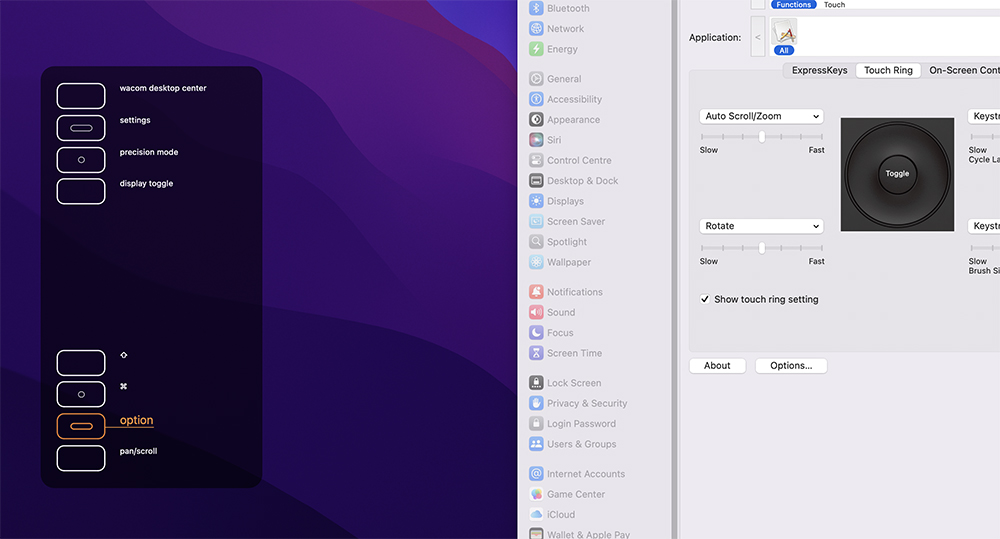
-

Hi Adrian Foo,
Thanks for reaching out. I'm sorry but I'm not sure I understand.
When you approach the pen to the surface, it moves slowly and the orange icon is highlighted on the overlay without touching any button?
My first impression is that you have an issue with the tablet circuit board and that you might be getting some ghost inputs but I cannot be 100% sure.
Best would be if you could make a video of the issue(s) and contact the support team directly.
https://support.wacom.com/hc/en-us/articles/4402518273943-How-do-I-contact-Wacom-Support
0 -
Hi Joao, thanks for replying.
You were right, I may have an issue with the tablet circuit board. When the pen touches the surface and I move the pen, the cursor is draggy and at the same time, the functions panel will appear on the left side of my computer screen. And when I further move the pen slightly, the panel will show the selection of panel buttons in highlighted orange colour, just like the screenshot I showed you, as if I'm using the pen to select the functions but it won't stop jumping up and down, just like you said, getting some ghost inputs. After that, the cursor would freeze and I could not use the pen at all.
At first I thought I needed to update the driver and I did, and the same thing happened. I even bought a new Pen Pro 2, problem still occurs.
Nevertheless, I'll be seeing a local Wacom distributor tomorrow and I'll show him the problem. He suggested it might be the driver's problem.
0
Please sign in to leave a comment.
Comments
2 comments