Wacom Center Not Opening

I'm using a Cintiq Pro 16 (2021) Version.
Installed the Wacom Driver 6.4.2-3.exe, wacom center not opening (I Just want to adjust the brightness and contrast of the device)
Tried installing-reinstalling multiple times, still not working.
Tried installing an older driver version, 6.4.0-10.exe. The wacom center is still not opening.
Everything is working fine, Wacom tablet properties and wacom update utility is working.
Whenever I click the wacom center app, there will be a loading icon on my cursor and that's it, nothing happens after that.
-

Hi Bradd,
Seems like something is preventing the Wacom Center from launching. Please make sure it's not being blocked by firewall or AV software.
I would also recommend doing a manual uninstall of the driver to remove any lingering files that may cause issues and then install the latest driver again.
If the issue persists, let me know.
0 -

I'm having the exact same issue and have redownloaded the driver. Its the latest one and its doing the same thing. I've been using a cintiq 22 for about 2 years, works wonders, never had an issue. But I wanted a portable set up and am testing it out on my pc, which is why I'm confused. My cintiq has asked for updates, but not recently, and its only this little wacom one thats asking for it, and then I cant open the wacom centre...
0 -
Hi Emily Peterson,
Do you get an error message when opening the Wacom Center?
Could you please clarify what are you doing exactly as well as how your device is connected?
0 -

Hi I am using Intuos Touch and Pen Small on M1 Mac OS 13.5 and up until recently the tablet has worked with no issues. Suddenly it's unresponsive and Wacom Centre either does not load or becomes unresponsive. Have uninstalled and reinstalled multiple versions with same results, nothing seems to work, but the tablet itself does register contact through the indicator LEDs.
0 -
Hi Chris Stokes,
Do you have an error message when you open the Wacom Center?
0 -
Hi João - thanks for responding.
If I install the latest driver package, there is no indication from any wacom software that anything is running, only from the OS that the install was successful. When I manually launch Wacom Centre it says it is syncronising for a long time, then finally times out and recommends restarting the app or contacting support.
If I remove all prefs and install the product specific driver package, again nothing launches automatically but manually launching the Wacom Centre brings up the main window where it seems no device is connected, but the app just freezes and requires force quit, no error message.
Again, haven't had any issues with hardware or software until the last few weeks when I noticed the tablet wasn't working. Before that it worked for years and I use on a semi frequent basis
0 -
Hi Chris Stokes,
Thanks for the details. I have created a support ticket for you so we can look deeper into the issue.
0 -

I am having the same problem - can SOMEONE FIX THIS!! I have work to do
1 -
Uninstall in your Wacom Tablet Utility does not work either - getting endless beachballing on a maxed out M2 Ultra - sort this
0 -

I am having the same problem, was excited to use my new Wacom until this... nothing works. Is there a fix yet?
0 -
Derek JonesCecilia Kembel - they should have posted the solution here really. It was mostly just throughoughly uninstalling all the wacom software and drivers with the tablet unplugged and then reinstalling and checking and changing all permissions. All things that I had done already but the order of it seemed to matter and at some point it jumped back into life.
0 -
Having to manually go through a ton of folders deleting files is not a good product experience - nothing changed at my end - all of a sudden tablet stopped working when I resumed a project with a tight deadline - anyways after searching I found the steps to manually remove and 'everything' and reinstall - i'm moving to ipad/apple pencil for my illustration work from now on - goodbye wacom.
0 -

same here- my intuos pro kept turning on and off , so i tried to pair it by bluetooth, but that didnt work ( apparently it should) . So, i got out my old intuos4 large - and it works, but the wacom control centre, wont let me change the pen settings or any settings . I've tried various drivers - Wacom directed me to driver 6.3.40-3. Went through the uninstall , re-boot, install , re-boot - This version didn't even recognise my tablet. But yet the tablet is working fine - pressure everything, just cannot get into those settings. i dont want to throw it away, like the cintiq that never worked properly! anyone got any suggestions , I've tried about 8 drivers now with no success. Wacom's last message was ..." it seems the issue is not the Wacom. As it is very unlikely that 2 devices do not work on the same computer. I suggest that you test either of the devices on a different computer and/or contact Microsoft to ensure all drivers ports are working correctly." Helpful not! The ports work! the tablet works - its just the wacom control panel that wont :(
0 -

On macOS 14 Sonoma, I'm seeing this screen. I uninstalled and re-installed the driver 3 times to no avail.
 0
0 -

Hi Jisoo L,
this is to be expected on macOS 14. See Is there a driver for macOS 14, Sonoma? – Wacom
We recommend to hold off with the update to macOS 14 until we have been able to release a driver for this new OS version.
-1 -

Hiya, i'm having issues as well. The Wacom center won't open on my DTK 1660 Cintiq 16, already did everything above and did nothing.
0 -
Can you describe what exact issue you are having? Which version of Mac OS are you using and which Wacom Driver version?
0 -
Actually i'm on windows 10, the wacom center won't open at all, i re-installed, erased all the files but the Wacom center won't open.
Driver vrs is the latest :
Driver 6.4.3-1 (Windows 7, 8, 10, & 11) (64-bit)
126 MB 09/08/20230 -
This means something in your system is preventing the Wacom Center from starting.
I have created a support ticket for you so we can take a more in depth look at what is causing this.
Cheers
0 -

Hello, I have the same problem and I am stuck on the "Waiting for Synchronization" page as well. Mac OS 13.5.2 Ventura.
It used to work before I successfully downloaded the Wacom Drive.
0 -
Kai Looks like people are having issues on macOS Ventura 13 as well. Shouldn't this be a P0 for you guys? Any estimated time to resolution? macOS 14 has been officially out for some time and it renders your products unusable, and Wacom isn't some knockoff maker..
0 -

Hello Wacom, I have the same problem like everyone else.
I'm working on a macbook pro macOS ventura 13.5.1, wacom intuos pro.
2 days ago I was still working with it and now it doesn’t open anymore.
I just have a shit load off work, so it would be super cool if you guys could fix this problem.
I also have reinstalled it a few times, but still the same.
I hope this is over soon, because using a mouse isn’t the same
0 -
Hello everyone,
This error usually means something is preventing the driver from starting properly, or that a portion the driver has been removed.
It is usually associated with this message which appears after the synchronization fails:
https://support.wacom.com/hc/en-us/articles/1500006339922-What-does-the-error-message-There-is-a-problem-with-your-tablet-driver-mean-and-how-do-I-fix-it-Please try:
- Uninstall and reinstall the driver - https://support.wacom.com/hc/en-us/articles/1500006264581-How-do-I-uninstall-and-re-install-the-Wacom-driver-on-Mac-OS-for-a-Pen-Tablet-Pen-Display-or-Pen-Computer-
- Check for any 3rd party software that may interfere with the driver - for example: https://support.wacom.com/hc/en-us/articles/9255930218903-How-should-I-troubleshoot-Clean-My-Mac-issues-that-can-disrupt-Wacom-components-and-services-
If the issue persists, please contact your regional support for more in depth troubleshooting and most likely, there will be something specific for your situation.
https://support.wacom.com/hc/en-us/articles/4402518273943-How-do-I-contact-Wacom-Support-
0 -
I hope I can help some one of you guys, but this RESOLVED my problem!!
https://youtu.be/QjqYY9T-jCQ?si=Gmwhp0tEgPUTcD94
1 -

My Wacom Desktop Centre wouldn't load either and my Intuos Pro wouldn't connect via Bluetooth since updating to Sonoma 14.1.1. Endless beachball. Not sure if this is relevant but I went to System Settings / General / Login Items / Allow in Background. The Wacom icon in that list wasn't switched on so I switched it on and suddenly everything went back to normal.
1 -

I have brand new Intuos Pro Small just received and installed today on a Windows 10 Pro x64 PC.
The Wacom Center won’t start. It just silently fails to launch when the wacomcenterui.exe is double clicked
I can see in Task Manager that there is a werfault.exe that gets launched for 1 second.Looking in the Application Event Log shows this for every launch attempt:
Faulting application name: WacomCenterUI.exe, version: 6.4.4.2002, time stamp: 0x64e81669
Faulting module name: KERNELBASE.dll, version: 10.0.19041.3636, time stamp: 0x326edcef
Exception code: 0xc000027b
Fault offset: 0x000000000012db22
Faulting process ID: 0x5df8
Faulting application start time: 0x01da22461cc46a67
Faulting application path: C:\Program Files\Tablet\Wacom\WacomCenter\WacomCenterUI.exe
Faulting module path: C:\WINDOWS\System32\KERNELBASE.dll
Report ID: 17c3d85f-72c5-4f0a-a140-9e7efde59336
Faulting package full name:
Faulting package-relative application ID:and then followed another Information entry:
Fault bucket 1663781766351631649, type 4
Event Name: APPCRASH
Response: Not available
Cab Id: 0Problem signature:
P1: WacomCenterUI.exe
P2: 6.4.4.2002
P3: 64e81669
P4: StackHash12_00f
P5: 0.0.0.0
P6: 00000000
P7: 80070002
P8: 0
P9:
P10:It looks to me like bad handling of a bug in the EXE.
Various DMP and XML files then get sent to Microsoft but are subsequently deleted, so you can't see them.
0 -
Hi Alex Bailey,
If I understand correctly, you are using 32-bit Windows 10 (because your Kernelbase.dll is located in C:\WINDOWS\System32\) but you installed Wacom driver 6.4.4-3 which is meant for 64-bit versions of Windows.
Please uninstall the Wacom driver (steps here) and install driver version 6.3.40-3 https://cdn.wacom.com/u/productsupport/drivers/win/professional/WacomTablet_6.3.40-3.exe
PS: Microsoft has stopped support for 32-bit
0 -
Hi Joao,
No its definitely a 64 bit Windows environment.
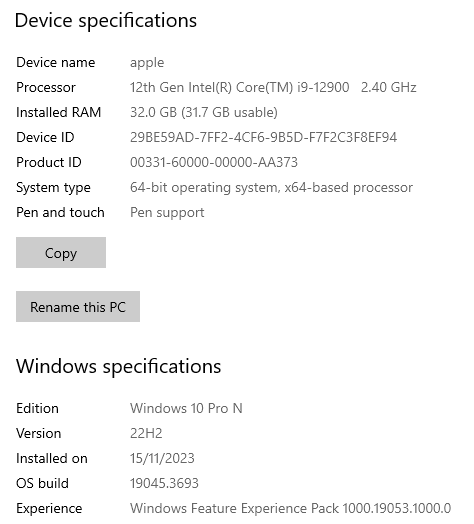
Regards,
Alex0 -
Hi Alex Bailey,
OK. Then this is an error with Kernelbase.dll file itself. You should perhaps update Windows and check the steps below if that doesn't work.
0 -
Hi Joao,
There is a lot of misinformation on the web (including from Microsoft 'experts') about which version of kernelbase.dll is 32 bit vs 64 bit. I've seen the same incorrect articles re-posted on many websites.
On a Windows x64 system the SysWow64 folder contains the 32 bit compatibility components, not the 64 bit versions. In the System32 folder of a Windows x64 system the components are 64 bit. The folder names are confusing people.
Another potentially false message I keep seeing is that the kernelbase.dll can be re-registered using 'regsvr32'. However everyone that tries this get the error that the DLL entry point cannot be found and that is most likely because it is a traditional DLL and not a COM-style DLL and so it does not have the COM interfaces to register. I'm trying to find confirmation of this.
'wacomcenterui'.exe calls the DLL 'ucrtbase.dll' first, which is part of the universal C runtime API. That then calls 'kernelbase.dll'. My installed version of the VC++ runtime is newer (v14.38.33130) than the one distributed with the Wacom driver (v14.31.31103) and I'm wondering whether there is an incorrect library file or something.
0
Please sign in to leave a comment.
評論
42 條評論