Clicks are not precise on Mac OS (it drags instead of click most of times)

Hello. I have been using wacom for years (around 15 years).
Some years ago I started noticing a annoying bug: A lot of my pen clicks are registered as a 'drag' behavior. I know probably i move my pen a tiny bit when clicking but this is common as it's impossible to click without dragging any milimeter. This is not a device or pen issue as i tried with different models, neither a computer issue as i also tried on others.
I asked a lot of my designer friends who also use wacom and they suffer the same thing. All i'm asking is to bring this to the developers and maybe find a way to workaround this in any future driver update.
Maybe we need a 'dead zone' configuration, or a thereshold where '5px movement' (as an example) is ignored by the tablet and the compyuter will register as a click, not a drag.
This is really getting into the way of my daily work and it's been hard to use wacom because of that.
Does anyone also suffers from this? Any good workaround?
Thank you so much,
Bruno.
-
João any chance you could take a look to see if you have an idea on how to fix that? I love wacom, trying to use a mouse instead to eliminate this problem (and it fixes) but my workflow is much better with my pentablet. Any way to make the pen less sensitive to micro pixel movements when trying to click things? Thank you so much!
0 -

Hi Bruno Ponzini,
Click drags happen most often because physically, the pen is still detecting pressure on the sensor.
There's a few things you can try:- Enable tip-up assist from the tablet options
- Adjust the click threshold setting so that the click (and holding) only happens at slightly higher pressure

If the click-drag is too severe, then perhaps there is a problem with the pen tip sensor and the pen will need to be replaced.
In that case, I would recommend you contact Customer Support directly for advice:
https://support.wacom.com/hc/en-us/articles/4402518273943-How-do-I-contact-Wacom-Support0 -
Thank you so much João. Yeah, i have been tweaking these settings to find a solution as well. Sometimes a feel it gets slightly better, but sometimes not. I've read on another forum that it looks like a specific issue with wacom and mac os (on windows it seems fine), which tells me that it's more about a driver/interaction witih the mac os than a problem on my hardware. I have a very old intuos 5 somewhere that i will bring back and test to see how it feels. If you have any other insight or idea on that please let me know! Thanks again, Bruno.
0 -
Hi Bruno Ponzini,
I am not aware of any differences between Mac and Windows regarding overall pen behaviour.
Please bear in mind that the data that the pressure tablet sends to the computer and is processed by the driver is exactly the same regardless of the operating system.
You can see the raw pen pressure data in the driver diagnostics: https://support.wacom.com/hc/en-us/articles/8413647279895-How-can-I-diagnose-an-issue-with-my-Wacom-Pen-deviceSome additional questions:
- What tablet are you currently using?
- Does the pen have an eraser?
- Does the eraser behave the same way?
0 -
Thanks again João! Yeah, i imagined that about the driver but i was imagining that maybe Windows could treat different the amount of pixels that need to be moved in order for the action be considered a 'drag'. So the information from the wacom driver would be the same but the way the OS would interpret could be different in my head (just mentioned that as i see some reports where people said both wacom and huion had this 'drag issue' on macos but when he tried on windows it was fine)
The Answers:
1 - it's a PTH-460 (small)
2- it does have an eraser.
3- i feel like the behavior is worse when i use the eraser. It's even harder to hit a clean click. I see this happens more in some moments like: clicking to select a co-worker to send a message in slack, clicking on a google search result page links, some sites with image galleries won't work with the pen as every little movement counts as a drag, which drags the image thumbnail gallery instead of registering a click to just show that image bigger, trying to select some gmail emails to open and read, etc).The pressure on diagnose seems fine, it's 0% with the tablet off and goes from 2% to 50% more or less during a quick test, but of course the 'X data and Y data' moves some 0.2 to 1mm when i click and it looks like this causes the drag. That's why if we could fine tune the thereshold to defing how much pixels or mm we need to move our pen to start considering a drag would solve i guess.
One of my last ideas to solve or minimize the problem is to order some felt nibs, imagining it would move slower in contact with the tablet surface which might help, but i don't know.
Thanks again for your time and attention :)
0 -
Hi Bruno Ponzini,
Thanks for checking. Ok, at least now we know there's nothing wrong with the Hardware.
The eraser will by slightly worse because it has more travel and is rounder so this was to be expected. If it performed much better than the front tip, then it could indicate a hardware issue.
I do understand what you mean. For me it took sometime getting used too and I had to find something that worked for me to be able to get more precise with the clicks. I try to rest my hand in a way that the tip is as close as possible to the surface without touching so that when I actually click, there's as less travel as possible and that has worked for me for the last 9 years.0 -
Hey Joao!
Yes, i also use wacom for 16 years, it was hard in the beggning but after some months it became my main input device and i never used mouses or trackpads. I know most people might use the wacom just to drawn or do some artistic use but i really do use for everything (navigating on google chrome, google search, slack, figma, fusion 360 and so on), and maybe that's why i do feel this dragging issue. I also map my tablet area a bit smaller so the pen move faster and i can work more efficiently (although I know if i decrease the speed it will help a bit with the drags).
I also got my old intuos 5 and the grip pen (pro pen 1? idk) to test. I tested the old pen into my current wacom and also the whole former kit and i got the same behavior.
To finalize, what is crazy to me is that during these 16 years, this never happened before, u used for like 12 oe 13 years and always loved. Around 3 years ago i started feeling this behavior and that's why i had the idea it could be something between the way the driver and the macOS communicate or work together. Anyway, i think we tried everything we could. Thanks a lot again and please let me know in case you (or someone) have a different idea that could help here.
Cheers,
0 -

Hi there!
Long time Wacom user here with the same problem. It started a couple of years ago with a certain macOS update, can't remember which one it was. Clicking has been very annoying since then. Unless I click very carefully precisely vertical, It immediately starts a drag action instead of a click. Some applications handle this better than others, but overall I have gotten used to clicking with my other hand on the trackpad of my MacBook to prevent the unwanted dragging.
But… I finally came around to fixing this! Being a developer I created a small utility that lives in the Menu Bar. What it does is capture all mouse click events and detects a drag start. When this is below the given number of threshold pixels I cancel the event. This results in a normal click when the pen up coordinates fall within the threshold value. When outside a normal drag event starts.
You can specify the threshold to see what works best for you. 10 pixels works great for me. See attached screenshot.
For anyone interested in testing this leave a comment. I will then try to make the app available for testing one way or another.
Happy clicking!
Maarten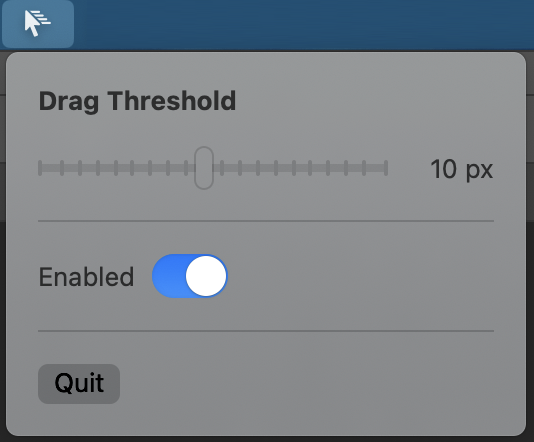 0
0 -
Hi M van Dillen,
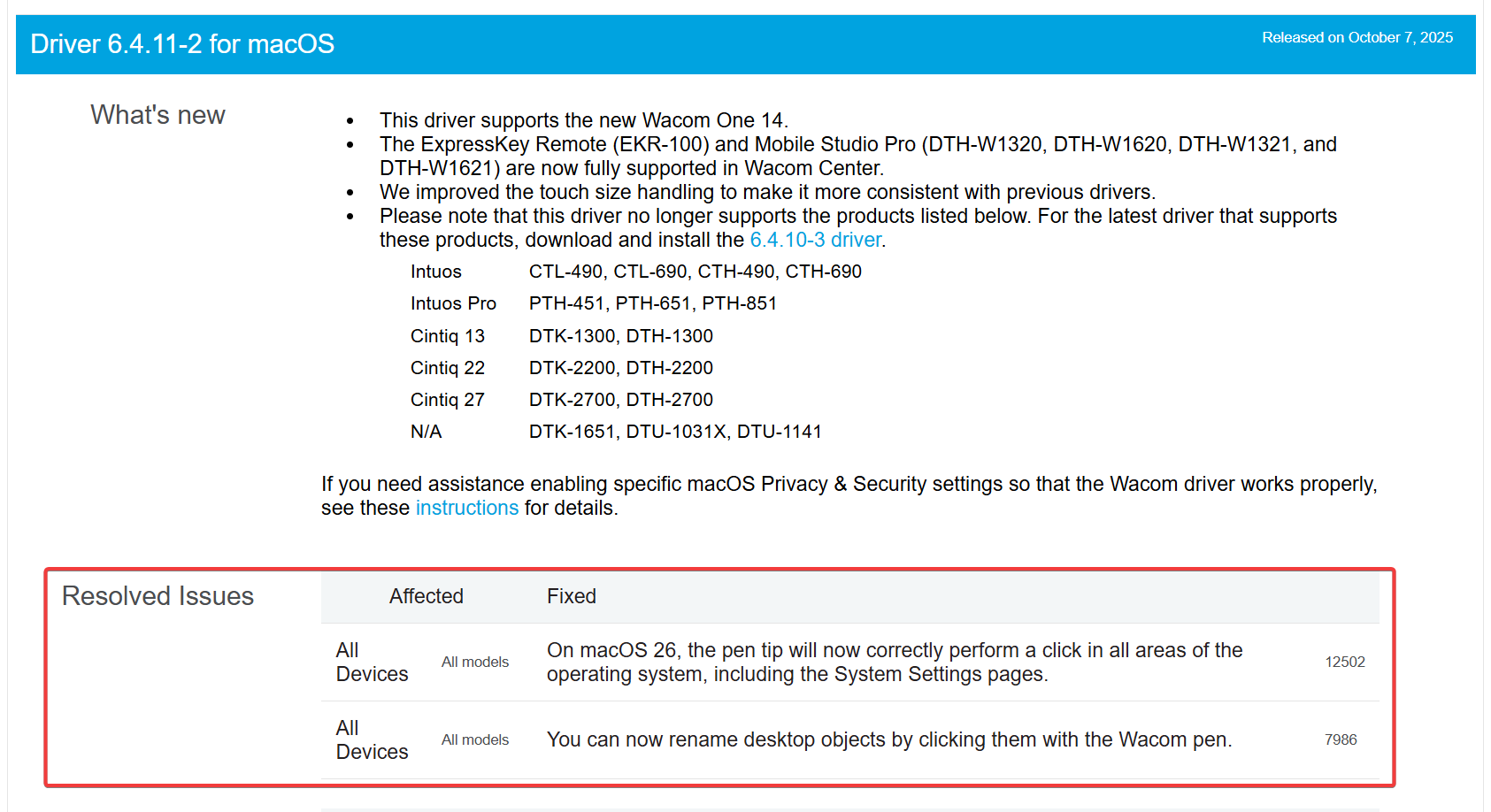
That is curious, we just released a new version of 6.4.11 that address this same issue in a similar way.
Would you mind installing and trying it out?
0 -
Hi João,
Thanks for your message. What a coincidence! I would almost say what took you so long, but my solution took me also a couple of years to come up with haha.
I have tested the new driver an it works pretty well!
How many pixels did you choose for the threshold? I was wondering because I couldn't find any reference to this in the settings dialog. Maybe you can add a control there to let us specify it?
For now I guess the new driver fixes my problem, so thank you for the update.
0 -
Hi M van Dillen,
Thanks for confirming. Actually the team had this solution figured out for sometime but we were waiting to see if the Mac update would fix the issue before publishing. Since that was not the case, we released the new version with our own fix. I don't know exactly what the set pixel threshold is but I can check if I can get that info.
Cheers
0 -
One problem I can foresee is that when drawing it also takes a couple of pixels before the first point is connected to the second, resulting in a straight line. With my own solution I can always disable the feature which results in more accurate beginnings of a curved line.
0 -

Hi M van Dillen!
We appreciate the feedback! I'm going to forward this to our Engineering team for further discussion, but before I do, can you help provide some more info?
- Are you seeing that point connection issue in all applications or just one?
- When testing your own implementation, what pixel value did you find worked best for you?
- What tablet model are you using?
- What are the model number(s) of your monitor(s)?
- How is/are your monitors configured in the OS?
- Is your tablet mapped to one monitor or all?
0 -
Sure!
1. I tested in Photoshop, but I suspect it will happen everywhere because that is just how it works? When a drag threshold is implemented system wide this will affect the accuracy of the early movement inside any drawing application.
2. I was using 10 px which worked great. Maybe we can go lower to 8 px.
3. Intuos BT M
4. DELL P2715Q
5. Extended display
6. Mapped only to the external DELL monitor
0 -
Thank you! I've submitted a ticket with a link to this forum thread. I hope to review this with our Engineering team soon. Would you be interested in reviewing a test build if we end up creating one with the requested changes?
0 -
João
That's cool! After getting used with mouse again after a long time without using it i came to test the new update for the clicks and it does feel much better indeed! The only downside is that some actions feels a little bit laggy or a small freeze when moving the cursor right after the click (like when you click and drag a box in figma or fusion360), but i guess this is due the thereshold and might be impossible to solve. Maybe fine tuning this value as M van Dillen suggested could be a way in.
What i noticed in my quick test during this morning is that if we turn off the 'tip double click distance" the tablet feels more responsive regarding the issue i just described but also the issues with the click precision appears again, specially in places like google chrome, trying to hit links from a google search result where you intend to click but the OS drags the link a tiny bit and the click is not registered, or trying to hit the press button on a song in spotify where it also drags and the play is not registered. It seems like just moving the 'tip double click distance' one tick to the right already solves the clicking issue (but adds the small freeze/lag that i mentioned). Anyway it's much better for precision work and hopefully the thereshold fine tuning is a way to improve it even more!Not sure this is helpful but just my impressions after testing a bit. Thanks Joao!
0 -
Hi Bruno Ponzini,
Thanks a lot for the feedback. I'll make sure the driver team sees this. Clearly some fine tuning will be needed on our end.
0 -
I have been testing the current driver version since my previous message and for me it has been a big improvement. If there is any finetuning done, please make it configurable. Maybe something like a hotkey that enables/disables the threshold.
0 -
João Yeah, much better indeed!
I feel like for people who use mostly to do artistic work like drawing, painting, editing photos, they might not get annoyed by this detail, but maybe for people like me, who 100% replace the mouse for the wacom and uses it for every action in the mac, it matters more.
I believe besides being able to enable/disable, if we could somehow experiment and set this theresold somehow (maybe similar to the 'tip double click distance' slider, or in pixels) it could be nice for sure.
Or maybe something that we can fine tune a timeframe where the cursor will register if it's a click or a intentional drag. Usually a click action will be super fast, just a fast touch between the pen nib and the tablet, so maybe after this time thereshold (that could be adjusted maybe) the cursor would ignore the 'area thereshold' and start the drag immediately. (maybe this is already what the 'tip double click distance' does, if so, it would just be nice to have more precision to fine tune the timings).Thanks a lot for paying attention on this topic, i'm excited to come back to using my wacom again! Even thinking about buying the inutos pro 2025. Do you know if this in new model anything is different that could could impact on this click precision? Both for the better of maybe something that could impact negatively?
Also here to test any build if helpful!
B.
0 -
Hi Bruno Ponzini,
Perhaps this is something that can go under the advanced features but I am not sure. I'll leave that to the engineers.
As for the Intuos Pro 2025, it comes with the more recent Pro Pen 3 which was also fine tuned. On paper, the specifications are not too far from some of the other pens, but it feels more responsive and precise than any other pen. I think it's something you should try and check if it works for you or not.
It also has the customizable dials which I find very useful. I use mine as a system volume control when I'm just browsing for example.
0 -
Thank you João!
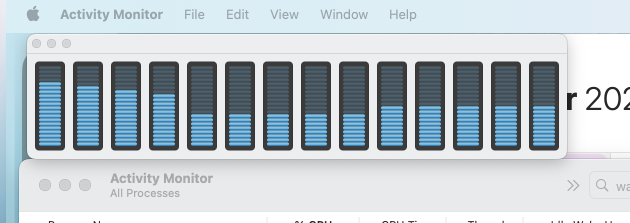
I really wanna try, what is holding me back a bit to pull the trigger on buying the new one is an issue that is happening to me using the last released driver. Summing up, the cursor either freezes for 5-10 seconds or stutters/lags occasionally during the usage. It happens randomly and i couldn't identify what could cause this. Restarting the driver doesn't solve, connecting straight to the macbook also doesn't solve (it's a PTH-460).
I noted that all CPU cores spike up drastically right after the freeze (image below).
Also noted that the driver keeps creating a Photoshop profile for the pen by itself. I tested using both my pen 2 and grip pen from older model and this also happens when connected by bluetooth. It happens like each 10 minutes or so.
Do you know what might be happening? Please feel free to move this to another topic if needed, i'm just posting here as it seems related to the driver release. Some system info:
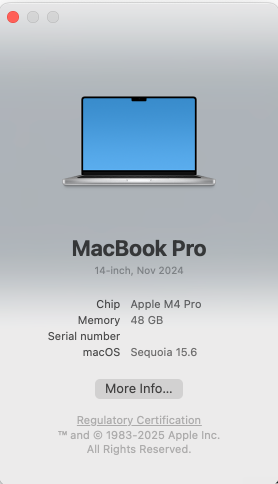
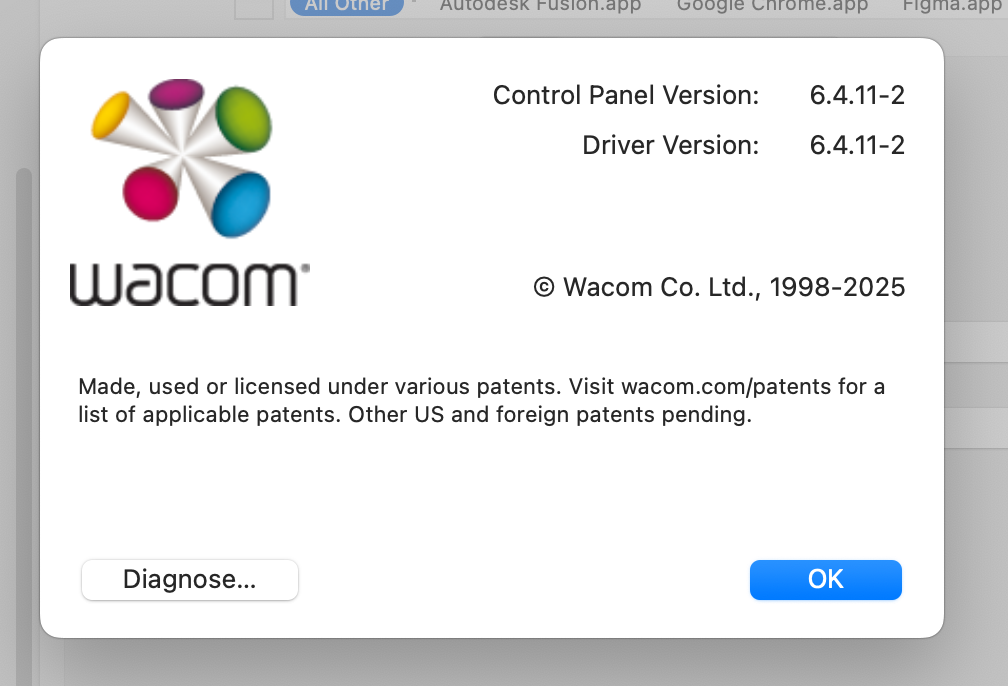 0
0 -
Hi Bruno,
We've been seeing this issue for a few years and have shared our findings with our partners at Apple and Adobe. As best we can tell, that spike in CPU activity is starving our driver software of CPU compute cycles. Our driver is software that runs in the background, interpreting your tablet hardware's input into something the OS can use for mouse movement, clicks, etc. When those spikes occur, our software hangs until the CPU can continue processing our events, which is what appears to cause the delay in movement and input on the tablet.
We've been working with Apple's documentation to develop a DEXT that we hope will run closer to the Kernel level like a USB mouse does, effectively giving us a higher priority for CPU cycles than other software and allowing us to avoid hangs in pen activity when those spikes occur.
Those spikes don't appear to happen in all applications. We do hear about it commonly with Photoshop, but it's unclear what they're doing that might be contributing to the issue. Another common issue was when opening or closing 4K video in Apple's Preview or QuickTime applications, but the CPU spikes generated by those are no longer reproducible after updates to Apple's operating system.
We're continuing to put effort towards this, but it's a difficult thing to workaround given that the root cause appears to be out of our control.
Best,
Greg
0 -
Thank you so much João and Greg
I see, that makes sense. What i can tell tho in case it helps on anything is that the freeze/stutter behavior happens even when very small tasks are running into the mac. I'm also noticing this gets much worse when photoshop is open, even when idle with no file open, on the background it already causes the cursor to freeze even when i am writing an email, or adding an event to my calendar (which in theory are very low demanding to the mac resources).
Maybe somehow photoshop even idle is getting in the way of the communication between Wacom drivers and input responses right?
Do we know if this is less noticeable on any mac OS version or if there is something to be done to avoid this issue (to me it's important to keep photoshop open as i use it ocasionally during the whole day).
Thanks again, and here to test or collaborate on anything that can make the experience better!
0 -
Hi Bruno,
There are several things about this issue that bother me, but the root cause is beyond my understanding. We first recorded this issue nearly three years ago and it's been a while since I've personally looked at it. We have some newer developers that haven't had a chance to look at it yet. I'm going to dig through my old notes and see if I can still reproduce those spikes on purpose so that the newer devs can weigh in on this. It's an incredibly frustrating issue.
I'm seeing in my notes that we identified a workaround early on, but it's not very convenient and I don't know if it still works. I'm going to test that this morning and I'll report back here with the results.
0 -
Thanks Greg, it's good to know that it is something that is mapped.
Some hours ago i shared with Joao using support@wacom.com 2 log files where i had the cursor spikes. They were not totally frozen but laggy/choppy/slow to respond. I compiled the log files right after the spike happened so they should be in the end of both files i imagine.
On both occasions i was not doing anything hardcore for the CPU and i might be connecting this issue with Photoshop somehow but also with command+tab to alternate between apps. Sometimes right after the app is switched the lag appears for like 5-7 seconds.
Hope it helps and here if anything else is needed!
Thank you,
0 -
Hi Bruno,
I'm unable to reproduce the issue, which does not discredit the issue, but the use cases we knew to reproduce this previously are no longer capable of triggering the issue. I tested on macOS 26.1 and 15.6.1. My previous method of opening a RAW file in Adobe Photoshop is no longer triggering the issue in 2025 or 2026. My other method of opening a large 4K video in Preview or QuickTime also no longer reproduces the issue. I need to find a new catalyst to trigger this issue in our test environments. Please let me know if you find anything on your end that is reliably reproducible and we'll try to do the same here.
As for the workaround, I can't currently confirm if this still works, but at the time of the original report we found that uninstalling our driver and reinstalling it allowed the user to work uninterrupted until they logged out or restarted their computer. The workaround would need to be repeated if the user logged out or restarted. It's inconvenient, though it can be quick when you're familiar with how to perform both of those actions. You're welcome to try this on your end to see if it at least allows you to work frustration free for several hours.
In the meantime, we'll be looking for new catalysts to reproduce this issue here.
Best,
Greg
0 -
Thanks! I just saw your reply, I'll play with Command+Tabbing more to see if I can get it to happen with that while my prior methods of reproducing this are still open in the background.
0 -
Thanks Greg!
Yeah, unistalling all the time will be incovinient ineed. Does the log files help? I have more here if helpful, i collected 5, right after the delay/stutter happens. I can't attach zip files here i guess but i can send it. I also feel like this happens after logging out and coming back and might be photoshop related even in bg (although closing photoshop once it is open won't fix the issue).
Let me know and thank you again,
0 -
João Good morning, hope you are doing well. After updating to Driver 6.4.13-4 i noted 2 things i want to share and maybe there is something to do about it.
1- To me, the issue from this thread appeared again (we trying to perform a click but due some tiny pen movement it is interpreted as dragging, making clicking incosistent in some moments). I don't know if something was reverted in the driver with the tolerances or other thing.
2- In Finder, either in list or column view, a lot of times that i just want to click and drag a file to another folder or to upload in chrome for example, it starts to drag and select multiple files. This is not exclusive from this latest driver. This is exactly the same problem as another user reporter here: https://www.reddit.com/r/wacom/comments/1r2of56/mac_tahoe_wacom_tablet_dragging_a_single_file/
Any ideas on how to work on those?
Thanks a lot as always!
*Mac OS is 26.4.1 (25E253)
0
Please sign in to leave a comment.
評論
29 條評論